WhatsApp Talk with us Nederlands

WhatsApp Business app or WhatsApp Business Platform?

Many organisations start handling customer contact through the free WhatsApp Business app. It's a logical first step, and for a small team it often works well for a long time.
Still, every growing customer service team eventually runs into the same question: how long will the app hold up? This blog shows where the limit lies and what the WhatsApp Business Platform does differently.

Two products with almost the same name

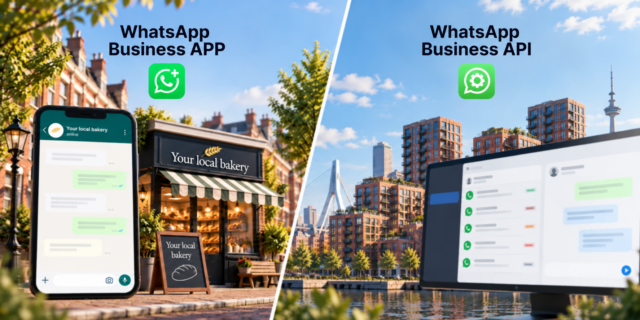
Meta offers two business versions of WhatsApp. You install the WhatsApp Business app on a smartphone. You set up a business profile, create automated messages and organise conversations with labels. Take the bakery on the corner. The owner answers the orders for Saturday personally, in between batches. For a business like that, the app does exactly what it needs to.

The WhatsApp Business Platform, also known as the WhatsApp Business API, has no app of its own. You connect it to other software, such as a contact centre solution or a CRM. That turns WhatsApp into a channel alongside telephony, email and chat, with the same routing and reporting.

Where the app starts to fall short

The app has hard limits. You usually only notice them once things get busy.

More agents than devices
The Business app runs on one primary phone, plus up to four linked devices. The corner bakery has more than enough with that. A customer service team of eight agents hits the limit straight away. Colleagues then end up sharing accounts or passing devices around, and both are stopgaps.

Nobody knows who’s picking up what
In the app, you can’t assign conversations to an agent. Two colleagues answer the same message, or neither of them does. The customer notices immediately. Queues, skills and priorities are missing too.

WhatsApp is cut off from everything else
If a customer calls after a WhatsApp conversation, the agent on the phone has no way of seeing that conversation. The customer has to explain their question all over again. Omnichannel customer contact requires a single history per customer, and the app has no connection to your CRM or contact centre.

You’re managing on gut feeling
How many WhatsApp conversations came in last week? How quickly did your team respond? The app only offers basic message statistics. You can’t use it to measure service levels or waiting times. For a customer service team that manages by KPIs, that’s a blind spot.

Customer data on separate phones
Conversations in the app are stored on your agents’ phones and linked devices. If someone leaves or a device gets lost, it’s hard to determine where customer data ends up. The Platform processes conversations centrally in your own systems. That makes agreements on retention periods and access under the GDPR much easier to manage.
What the WhatsApp Business Platform does differently

Through the Platform, WhatsApp arrives in the same environment your team already works in. In a contact centre solution such as Puzzel, that means:

  • WhatsApp conversations enter a queue and are routed to the right agent or skill group.
  • An unlimited number of agents can work on the same number at the same time, each with their own login.
  • The agent sees the customer history across all channels, including data from the connected CRM.
  • WhatsApp counts towards the same reports and service levels as your other channels.
  • A chatbot or virtual agent can handle simple questions and pass complex ones on to an agent.

The Platform does require more preparation. You need a Meta Business account, a verified business and a partner to handle the technical integration. Messages you initiate yourself must use templates approved in advance by Meta.

What does the Platform cost?

The app is free. With the Platform, you pay per message. Meta has used this model since 1 July 2025, and from 1 October 2026 it applies to customer service as well.

Messages you initiate are templates that Meta approves in advance. They fall into three categories: marketing, utility (such as an order confirmation or appointment reminder) and authentication. What you pay depends on the category and the recipient’s country.

When a customer messages you, a 24-hour customer service window opens. Until 1 October 2026, your replies within that window are free. From that date, you also pay for those replies, and for utility templates you send within the window. A service message costs the same per country as a utility or authentication message. Volume discounts don’t apply to service messages.

Messages customers send you remain free. The same goes for the 72-hour window that opens when a customer gets in touch through a Click-to-WhatsApp ad.

For a customer service team, costs therefore grow with the number of replies your team sends. A question resolved in one clear message costs less than a conversation spread over ten separate short messages. On top of that come the costs of the software you use with the Platform, such as your contact centre licence.

The app and the Platform side by side

The Business app suits businesses like the corner bakery: sole traders and small teams with a manageable flow of messages. It’s free and works on one phone with up to four linked devices. You can’t assign conversations, and the app has no connection to your CRM or contact centre. Reporting is limited to basic statistics.

The Platform is built for customer service teams and contact centres. As many agents as you like can work on it, and conversations are routed through queues to the right person. Because it connects to your CRM and contact centre, WhatsApp counts towards your KPIs and service levels. A virtual agent can handle the first contact. You pay per message sent, including replies to customer questions.

How do you know it's time to switch?

If you recognise two or more of these situations, it’s worth looking into the Platform:

  • More than four or five people answer WhatsApp messages.
  • Messages are left unanswered, or customers get duplicate replies.
  • You want to include WhatsApp in your service levels and reports.
  • Agents look up customer information in another system while chatting.
  • You want to send messages proactively, such as reminders or status updates.

In most cases, you can take your existing WhatsApp number with you to the Platform. Customers then don’t need to save a new number.

Connecting WhatsApp to your contact centre

Sound of Data connects WhatsApp to your contact centre through the Business Platform. We handle the technical integration, set up routing and reporting, and make sure WhatsApp runs alongside your other channels. Want to know whether switching makes sense for your customer service? Get in touch with us.